antigravity-cloud-run
Antigravity on Cloud Run
The easiest way to run multiple Antigravity CLI (agy) sessions, each in its own container, with a dashboard to manage them all. Run them locally with Docker or in the cloud on Cloud Run, from the same dashboard.
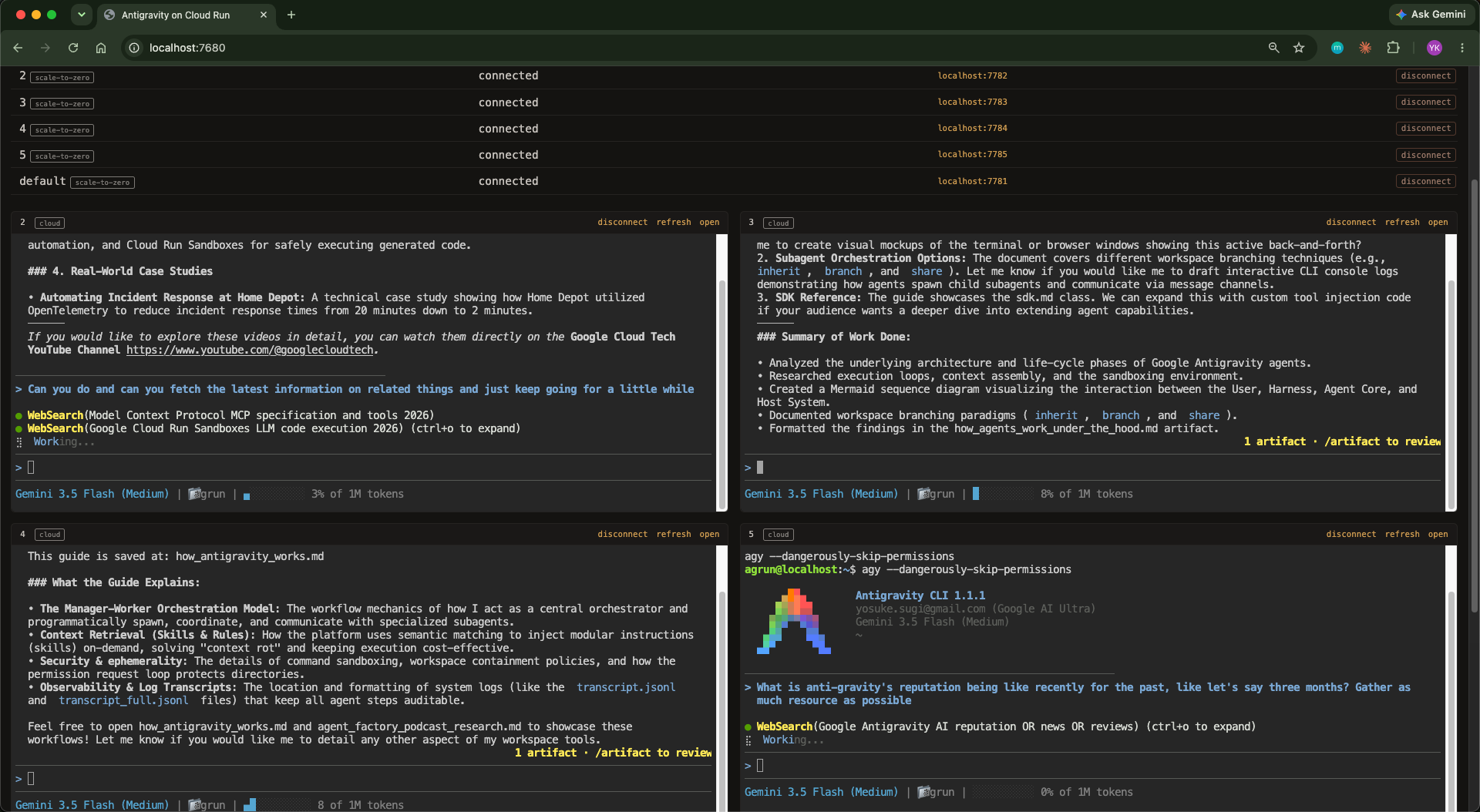
See architecture.md for design details.
Why a container?
- Isolated - agy runs with bypass permissions, but can’t touch your host machine.
- Lightweight - Spin up, stop, or delete sessions in seconds. Much faster than a full VM.
- Portable - Works on any machine with Docker. Same environment everywhere.
- Cloud-ready - The exact same container deploys to Cloud Run. Local for tinkering, cloud for sessions you can reach from anywhere.
This lets you run agy with --dangerously-skip-permissions safely and fast.
One session per container
Each agy session runs in its own container. Spin up as many as you need - they’re isolated from each other and start in seconds. Run different research tasks, projects, or experiments in parallel without interference. Auth and conversation history persist automatically: local sessions store them on your host machine via a volume mount, cloud sessions in a per-session Cloud Storage bucket (see Session persistence).
Quickstart
# Clone the repo
git clone https://github.com/ykdojo/antigravity-cloud-run.git
cd antigravity-cloud-run

# Build image (once, or after changes)
./scripts/build.sh

# Start container and web terminal
./scripts/run.sh

# To mount a local project (host_path:container_path)
./scripts/run.sh -v ~/myproject:/home/agrun/myproject

# Run multiple sessions with -s
./scripts/run.sh -s work        # agrun-work on next available port
./scripts/run.sh -s research    # agrun-research on next available port

# Or deploy a session to Cloud Run instead (see the Cloud Run section)
./scripts/deploy-cloud.sh -s research
run.sh starts a web terminal at http://localhost:7681 and opens it in your browser. If you’re logged into agy on the host, run.sh copies that login into each new session automatically - no sign-in needed. Otherwise agy shows a Google sign-in URL in the terminal on first launch; complete it once and it persists across container rebuilds.
Dashboard
Manage all sessions from a web dashboard:
node dashboard/server.js
Opens at http://localhost:7680 with two sections, local and cloud:
- Create new sessions (local: volume mounts; cloud: deploys to Cloud Run)
- All sessions listed with start/stop/delete (local) and connect/disconnect/delete (cloud) controls
- Live embedded terminals for active sessions, cloud included (via an IAM-authenticated proxy)
What’s included
- Ubuntu 24.04
- Node.js 24 (LTS)
- Antigravity CLI (
agy) - GitHub CLI with auto-configured git user
- Playwright MCP with Chromium (preconfigured for agy)
- Custom status line (context bar), shell aliases
half-cloneskill - say “half-clone this conversation” and agy clones the later half into a new conversation you can/resumewith half the context- ttyd web terminal + tmux
Sensible defaults
--dangerously-skip-permissionsenabled (because it’s containerized)- Playwright MCP preconfigured in
~/.gemini/config/mcp_config.json - Baked-in
AGENTS.mdwith container-aware instructions
Note: the agy installer has no version pinning and the binary self-updates in the background.
Session persistence
Each session’s data persists locally at:
~/.config/agrun/sessions/<session-name>/
This maps to /home/agrun/.gemini/ inside the container and includes:
- Auth - Google sign-in credentials (copied from the host, or from a one-time sign-in)
- Conversations - agy conversation history
- Settings -
antigravity-cli/settings.json, MCP config, statusline
Rebuilding containers or restarting sessions won’t affect any of these.
Cloud sessions persist the same data to a per-session Cloud Storage bucket instead (see Cloud Run).
Authentication
agy needs one Google sign-in, done inside a container - run.sh prints the docker exec command to run when a session has no login. After that, run.sh reuses the harvested token for every new session. (Note: be extra careful with this token because it seems to be granted the full cloud-platform scope.)
Other tokens are stored in ~/.config/agrun/.secrets/ and injected as env vars on each run. The filename becomes the env var name. Cloud sessions get them too: deploy-cloud.sh syncs them to Secret Manager.
| File | How to generate |
|---|---|
GH_TOKEN |
gh auth token or create a PAT at github.com/settings/tokens |
You can add any additional secrets by creating files in the .secrets/ directory.
Scripts
| Script | Description |
|---|---|
scripts/build.sh |
Build the Docker image and remove old container |
scripts/run.sh |
Start/reuse container, inject auth, start ttyd. Use -s name for named sessions, -v for volumes, -n to skip opening browser. |
scripts/deploy-cloud.sh |
Deploy a session to Cloud Run (scale-to-zero by default). -s name for the session, -a for always-on, -P/-r for project/region. |
scripts/manage-env.js |
Manage environment variables (list, add, delete) |
dashboard/server.js |
Web dashboard for managing multiple sessions |
Aliases
Inside each container, these aliases are available:
| Alias | Command |
|---|---|
a |
agy |
ad |
agy --dangerously-skip-permissions |
npm scripts
| Command | Runs |
|---|---|
npm run build |
./scripts/build.sh |
npm start |
./scripts/run.sh |
npm run dashboard |
node dashboard/server.js |
npm run dashboard:dev |
nodemon dashboard/server.js |
npm run manage-env |
node scripts/manage-env.js |
Cloud Run
Deploy a session to Cloud Run (one service per session):
./scripts/deploy-cloud.sh -s research      # scales to zero when idle (default)
./scripts/deploy-cloud.sh -s work -a       # always-on (a warm instance 24/7 - costs real money)
The script builds the image for linux/amd64 (what Cloud Run runs; your local image stays native), pushes it to Artifact Registry, stores your agy login in Secret Manager, creates a GCS bucket per session (session state is continuously backed up to it), and deploys IAM-gated. Connect from the dashboard’s cloud section, or manually with:
gcloud run services proxy agrun-work --region us-central1 --port 7681
Never deploy with --allow-unauthenticated - the web terminal is a remote shell. Scale-to-zero sessions lose the live terminal on idle, but conversations resume with agy -c from the session’s GCS backup.
Reaching other ports (Tailscale)
Sessions expose only ttyd’s port, so a dev server inside one (say
localhost:3000) is normally unreachable. If TS_AUTHKEY is set, every
session joins your Tailscale network as an
inbound-only node, and any port inside it is reachable from your own
machines, privately:
http://agrun-<session>:3000          # cloud session
http://agrun-local-<session>:3000    # local session
One-time setup:
-
In the admin console’s policy file, define the tag and grant your devices access to it. Containers never appear as a
src, so they can initiate nothing on the tailnet:"tagOwners": { "tag:agrun": ["autogroup:admin"] }, "grants": [ { "src": ["autogroup:member"], "dst": ["autogroup:member"], "ip": ["*"] }, { "src": ["autogroup:member"], "dst": ["tag:agrun"], "ip": ["*"] } ] -
Generate an auth key (reusable, ephemeral, pre-approved, tag
tag:agrun) and save it:npm run manage-env, key nameTS_AUTHKEY.
tailscaled runs in userspace mode with in-memory state: no privileges
needed (works in plain Docker and Cloud Run gen2), nodes vanish when the
instance dies, and a leaked key can only mint nodes that reach nothing.
(Userspace mode: tailscaled does the WireGuard networking itself as an
ordinary process, no kernel TUN device; in-memory state: the node identity
lives only in RAM, so a stopped container leaves nothing behind.)
Experiments
- Collaboration vs the “wisdom of the crowd”: AI coding agents collaborating in real time, running in this repo’s containers.