Awesome Agents on Google Cloud
From prototype to production: a self-hosted voice agent on a single Cloud Run GPU
What is it actually like to build an AI agent with open-weights models?
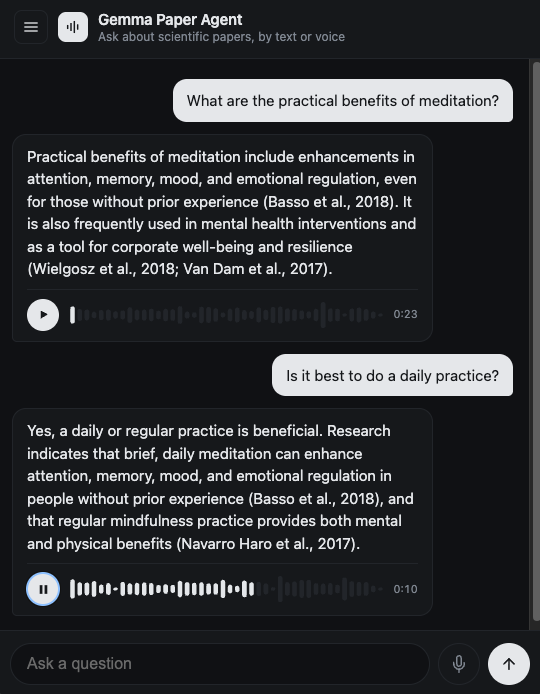
In this article I’ll show you how I built a voice agent that answers questions about scientific papers. You ask a question by text or voice, it searches and fetches papers, and the answer comes back as text and voice. Three open-weights models run the whole thing on a single GPU on Google Cloud: Whisper for speech-to-text, Gemma 4 31B as the brain, and Kokoro for text-to-speech.
My goal with this post is to give you an intuition of what it actually takes to build a system like this. Note that you can swap in any data source you want, public or private, instead of the paper search. For example, you can use the same pipeline to build your own customer support agent with access to internal data.
Why open weights
There are a few reasons why you might want to use open-weights models.
First, total control. You can host the model anywhere you want: locally if you have a big enough GPU, or on any infrastructure you choose, and you can swap it anytime in the future. There’s also the option to fine-tune it for your specific use case. And from a cost perspective, it can be cheaper if you have high-volume sustained traffic.
Another nice benefit is that you can potentially put multiple models on a single GPU. In this particular case:
| Model | Role | VRAM |
|---|---|---|
| Gemma 4 31B (fp8) | brain: reasoning + tool calls | ~30 GB + KV cache |
| Whisper large-v3-turbo | ears: speech-to-text | ~2 GB |
| Kokoro 82M | mouth: text-to-speech | under 1 GB |
One RTX 6000 Pro has 96 GB, so the whole stack shares a single GPU. You get charged per hour for each GPU you use. So by putting all three models on a single GPU, you only get charged for one instead of three separate ones.
Screenshot & demo
The architecture
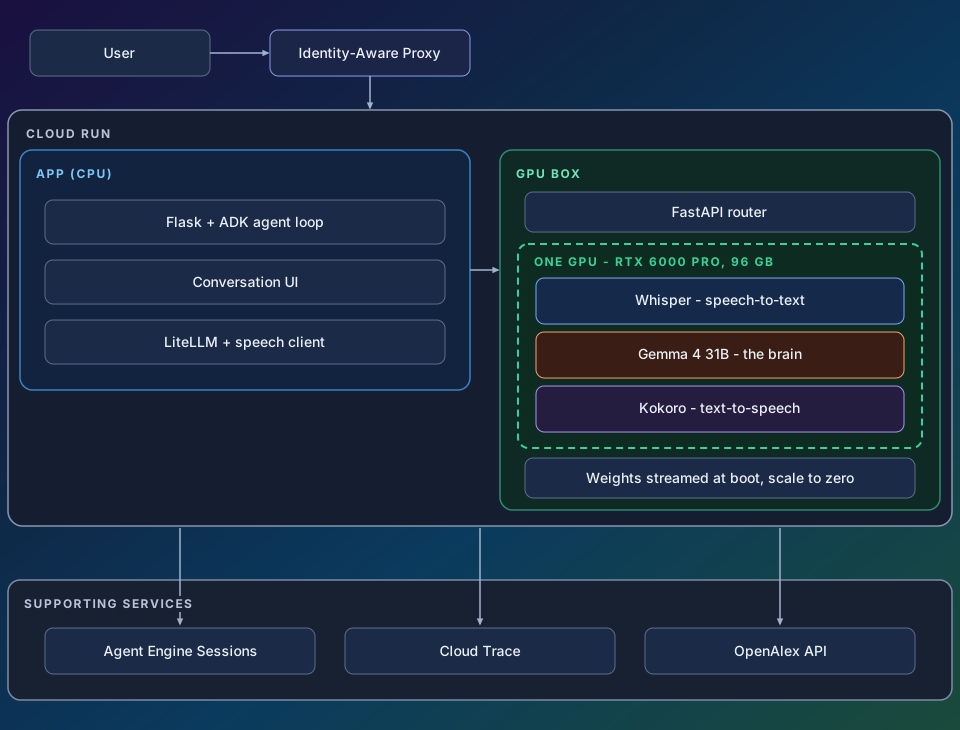
It’s two Cloud Run services that talk to each other:
- The app (CPU, small): the chat page, the ADK agent loop, and a way to securely communicate with the GPU box.
- The GPU box: a FastAPI router owning the exposed port, two vLLM processes behind it (Whisper and Gemma on localhost ports), Kokoro inside the router. Gemma’s weights stream from a public GCS bucket at boot. The small models are baked into the image.
I decided to separate this into two services instead of shoving everything into one box so that it’s faster to iterate over the frontend application.
The rest of the architecture diagram will be covered throughout the rest of the article.
How I built it, step by step
Step 1: verify a GPU container runs on Cloud Run
When I first tried to build this a few weeks earlier, I had trouble getting GPU quota in my Google Cloud account. So before building anything real, I wanted to clear that basic hurdle: get any Cloud Run container running with a GPU. I wrote hello-gpu/, an HTTP server whose only job is to run nvidia-smi and return its output. nvidia-smi is NVIDIA’s command-line tool that reports the GPUs the driver can see. I deployed it with one command:
gcloud run deploy hello-gpu \
  --source . \
  --region us-central1 \
  --gpu 1 --gpu-type nvidia-l4 --no-gpu-zonal-redundancy \
  --cpu 4 --memory 16Gi \
  --max-instances 1 \
  --allow-unauthenticated
That’s a full GPU service from a source folder: Cloud Run builds the container, attaches one L4 GPU, and gives you a URL. Curling it returned the nvidia-smi table with the L4 in it, which confirms the driver sees a real GPU. The L4 is the smaller of the two GPU types Cloud Run offers, with 24 GB of memory. The real stack later runs on the bigger one, the 96 GB RTX 6000 Pro.
Step 2: build the chat app and the agent loop
Then I built the app (app/): a chat page backed by an ADK agent with two tools I wrote, search papers and fetch one paper (app/tools.py). I wrote them using the OpenAlex API, a free public index of academic papers. The whole agent is this:
_agent = Agent(
    name="paper_agent",
    model=MODEL_ID,   # a hosted Gemini model at this point
    instruction=SYSTEM_PROMPT,
    tools=[tools.search_papers, tools.get_paper],
)
An agent in ADK is exactly those four things: a name, a model, a system prompt telling it to ground answers in real papers and cite them, and a list of tools.
The tools are plain Python functions. ADK reads their signatures and docstrings, presents them to the model as callable tools, runs whichever ones the model asks for, and feeds the results back.
The model at this point was a hosted Gemini model: good for quick testing while the rest of the system took shape.
Step 3: build the transcription path
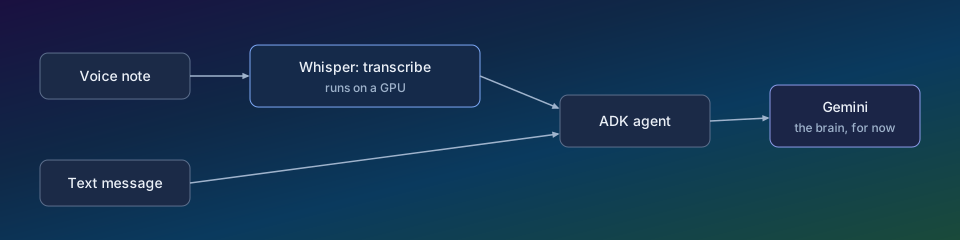
For voice input, I built a transcription step into the chat endpoint. When a voice note arrives, this is what happens to it:
if audio:
    transcript = speech_client.transcribe(audio, audio_mime)
    yield json.dumps({"type": "transcript", "text": transcript}) + "\n"
    message = f"{text}\n{transcript}" if text else transcript
The pipeline: audio goes to Whisper, the transcript comes back as text, and that text becomes the message the agent receives (full file).
Whisper itself runs on the GPU: vLLM can serve Whisper large-v3-turbo. The app just posts the audio to it and gets JSON back (client code).
The transcript is also shown in the UI: it fills your chat bubble, so you see what the system heard.
Step 4: build the text-to-speech path
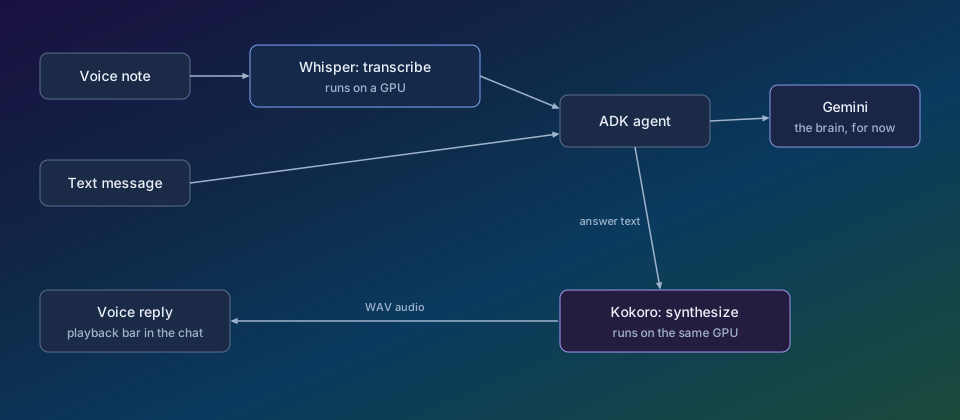
The reply makes the same trip in reverse: once the answer has streamed in as text, the app sends it to Kokoro and gets audio back. This is the code that turns the text into speech, running on the GPU box:
def _kokoro_pipeline():
    global _kokoro
    if _kokoro is None:
        from kokoro import KPipeline

        _kokoro = KPipeline(lang_code="a")  # American English
    return _kokoro

voice = body.get("voice") or os.environ.get("KOKORO_VOICE", "af_heart")
pipeline = _kokoro_pipeline()
chunks = []
for _, _, audio in pipeline(text, voice=voice):
    chunks.append(audio.numpy() if hasattr(audio, "numpy") else np.asarray(audio))
The pipeline: answer text goes in, Kokoro turns it into audio chunk by chunk, and the chunks are joined and returned as a WAV file. The helper at the top loads the model once, on first use, and every request after that reuses the same loaded pipeline (full file).
In the UI, each reply gets a playback bar, and the voice is generated on demand when the answer arrives.
Step 5: self-host the models
I put all three models in the GPU box (gpu-speech/) and swapped the interim Gemini brain for self-hosted Gemma. ADK allows you to make the swap in a few lines of code. The model=MODEL_ID from step 2 became:
LiteLlm(
    model=f"openai/{MODEL_ID}",
    base_url=MODEL_API_BASE + "/v1",   # the GPU box
    api_key=_fetch_identity_token(),   # refreshed before each turn
    extra_body={
        "chat_template_kwargs": {"enable_thinking": True},
        "skip_special_tokens": False,
    },
)
That object goes straight into the agent’s model field, and nothing else about the agent changes:
_agent = Agent(
    name="paper_agent",
    model=_self_hosted_model(),   # returns the LiteLlm above
    instruction=SYSTEM_PROMPT,
    tools=[tools.search_papers, tools.get_paper],
)
This tells the agent three things:
- Where the brain lives: the GPU box’s URL, which vLLM exposes as an OpenAI-compatible endpoint.
- How to prove it’s allowed in: a Google-signed identity token instead of an API key, because the box rejects anonymous callers.
- To run Gemma with thinking mode on (full file).
Tool calling works because vLLM ships a parser for Gemma’s tool-call format (--tool-call-parser gemma4) (launch script).
Step 6: add sign-in and make conversations persistent
I put Google sign-in in front of the service with Identity-Aware Proxy, Google Cloud’s built-in sign-in layer. The app turns each signed-in request into a stable user ID:
def _user_id() -> str:
    assertion = request.headers.get("X-Goog-IAP-JWT-Assertion")
    claims = g_id_token.verify_token(
        assertion,
        ga_requests.Request(),
        audience=audience,
        certs_url="https://www.gstatic.com/iap/verify/public_key",
    )
    if claims.get("iss") != "https://cloud.google.com/iap":
        raise PermissionError("bad IAP issuer")
    return claims["sub"].replace(":", "_")
The function checks the token’s signature and extracts a stable user ID. That ID carries no email or other personal information, and it’s the only identity data the app stores: conversations are keyed on it, so each person only ever sees their own (full file).
For storage, ADK’s session service is swappable in a line. I pointed mine at Agent Engine Sessions, used purely as a session store:
_sessions = VertexAiSessionService(
    project=os.environ.get("GOOGLE_CLOUD_PROJECT"),
    location=os.environ.get("SESSION_LOCATION", "us-central1"),
    agent_engine_id=AGENT_ENGINE_ID,
)
_runner = Runner(app=_app, session_service=_sessions)
That’s the entire storage change: same agent, same runner, but every message and tool result now lands in a managed store. It survives restarts and is reachable from any instance, instead of living in process memory (full file).
On top of it I built a standard conversation UI: a drawer that lists conversations, plus switch, rename, and delete.
Step 7: prototype to production
At that point I had a pretty solid working prototype, but I wanted to take a few steps to bring it closer to production.
Error recovery
I enabled ADK’s resumability, so a turn that dies midway resumes from its last persisted event, whether that’s a tool call, a tool result, or the user’s message, instead of the user retyping it:
_app = App(
    name=APP_NAME,
    root_agent=_agent,
    resumability_config=ResumabilityConfig(is_resumable=True),
)
That flag does the heavy lifting (full file). To make it work, the app has a retry endpoint and a Retry button on the failed turn.
Observability
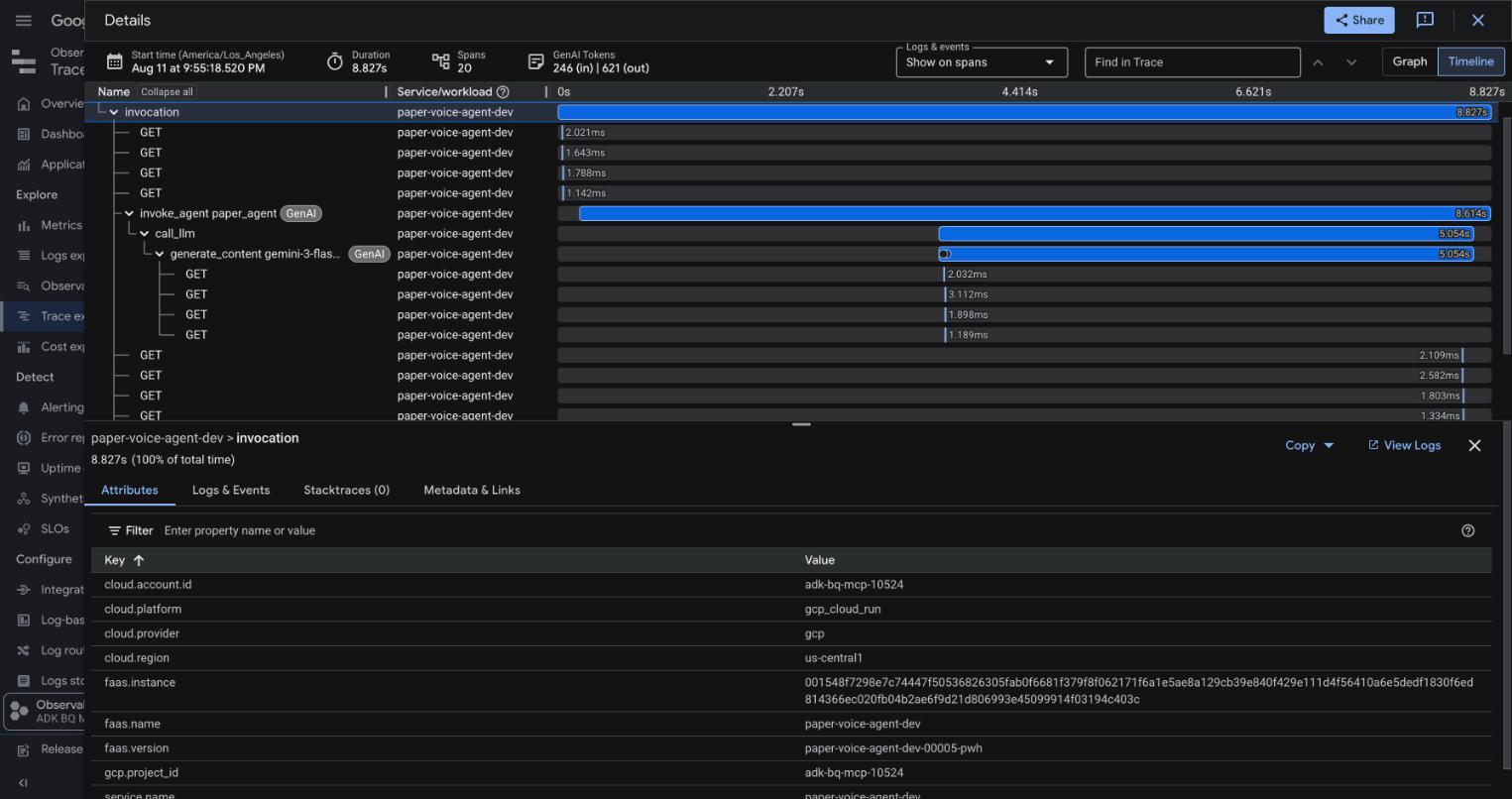
ADK instruments the agent loop with OpenTelemetry natively. Every turn produces a trace like the one above. Each bar is a span, one timed step of the turn: a model call, a tool call, and the agent run that contains them, with token counts attached. All I had to add was export wiring - a few packages and a few lines that install a Cloud Trace exporter using ADK’s own helpers:
import google.auth
from google.adk.telemetry.google_cloud import get_gcp_exporters, get_gcp_resource
from google.adk.telemetry.setup import maybe_set_otel_providers

credentials, project = google.auth.default()  # the identity the service runs as
maybe_set_otel_providers(  # install as the app's OpenTelemetry provider
    otel_hooks_to_setup=[
        get_gcp_exporters(  # exports spans to Cloud Trace
            enable_cloud_tracing=True, google_auth=(credentials, project)
        )
    ],
    otel_resource=get_gcp_resource(project),
)
The helpers come from ADK’s telemetry modules, as the imports show. google.auth.default() returns the identity the service runs as: every Cloud Run service has its own Google Cloud identity. The helpers build a Cloud Trace exporter authorized as that identity and install it as the app’s OpenTelemetry provider. From then on, every span ADK emits is sent to Cloud Trace automatically. There’s nothing per-turn to write (full file).
Evals
I wrote six eval cases (eval/) in three groups: questions that must call the search tool, questions that must not (a greeting shouldn’t trigger a search), and an ambiguous one that should ask for clarification. Each case’s reference is a rubric scored by an LLM judge, because judges survive rephrasing and exact-match metrics don’t. The judge is test infrastructure, not part of the product.
A temporary performance issue and its lessons
The one slow part of this stack turned out to be session storage, the Agent Engine store that keeps each conversation’s history. While building the app, I measured the basic session operations. Creating a session, reading it back, and appending new messages each took seconds, and the first session created after the app started took 10+ seconds. Session I/O, not the GPU, was where the time went.
The mitigation: when you open a new conversation, the app creates its session in the background while you type your first message. Starting a conversation went from seconds of waiting to feeling instant.
Afterwards, I tried my best to reproduce the issue with a set of controlled benchmarks (tests). This time, the latency was at most a few seconds, depending on the locations of the services. So it seems it was a temporary issue affecting the backend service at that point in time.
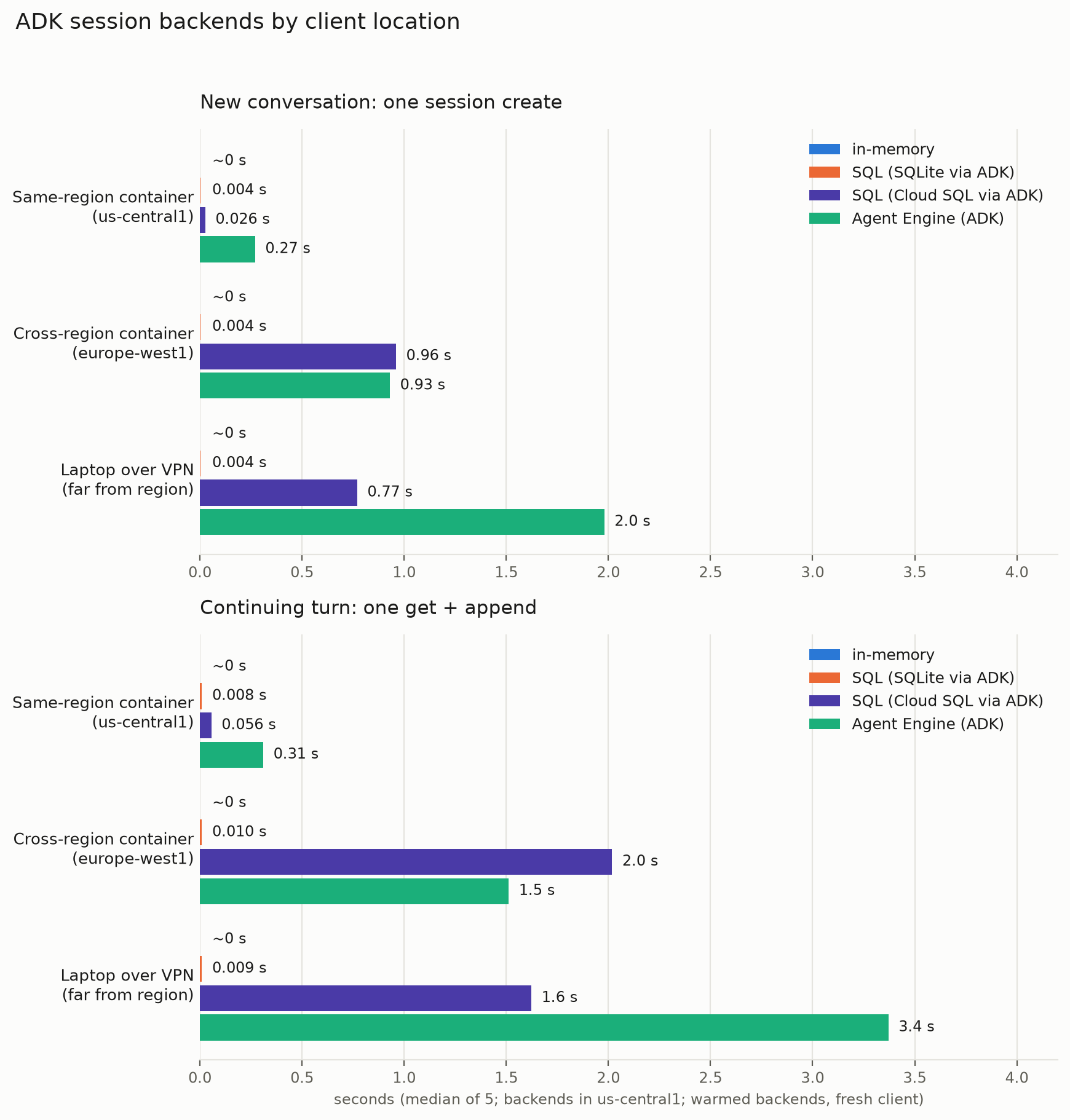
Through this set of tests, though, I realized the importance of colocation: from a container in the same region as the backends, every operation measured sub-second, while the same calls took seconds from another continent or from my laptop. Each session operation crosses the network, so the distance shows up in every turn.
You can also try different backend options, like Cloud SQL and Agent Engine, to see what works best for you. Depending on your particular setup, Cloud SQL can be faster: colocated, it measured 0.056 seconds per continuing turn versus 0.31 for Agent Engine. That said, there shouldn’t be a dramatic difference based on these tests.
Open it to real users
The first real user found a real bug within hours: when the paper search failed upstream, the tool caught its own exceptions, apologized politely, and logged nothing. The failure was invisible everywhere except the user’s screen. The fix was twofold. The likely cause was rate limiting, so I changed how the app calls the OpenAlex API: requests now carry a contact email, which OpenAlex rewards with a much higher rate limit. And whether or not that was the right diagnosis, I made sure similar failures can’t hide again. Now the app logs the exact exception for every failed request to OpenAlex. In addition, the tool marks the degradation on its own trace span, so the failure shows up in the trace whenever the tool call fails.
What’s next
All the code in this post is in the repo: ykdojo/gemma-voice-agent. From here, fine-tuning Gemma on domain data is the natural next step. You can check out how to do that in this article by Shir Meir Lador.